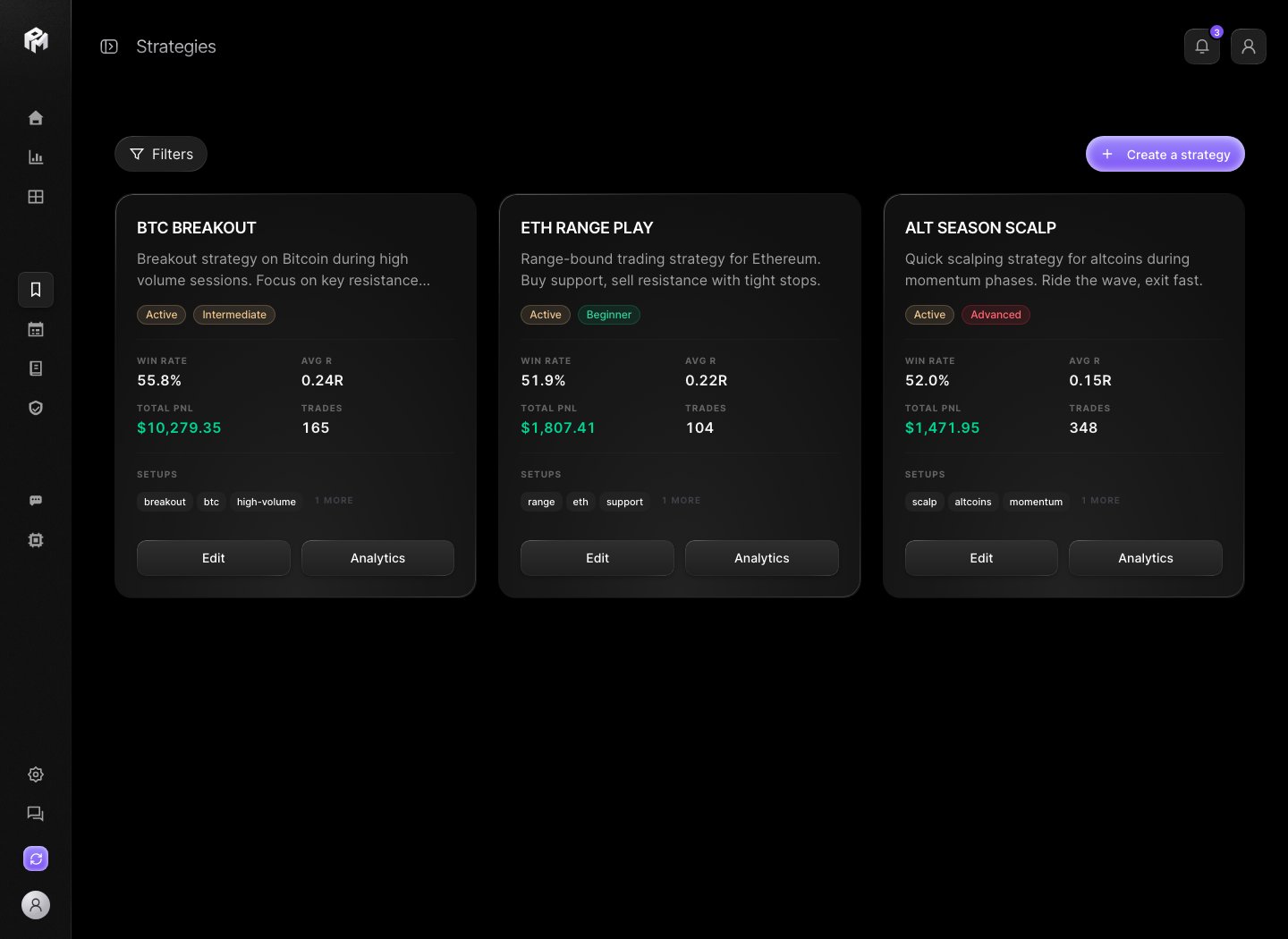
Strategies is where you define, review, and measure your trading playbooks. A playbook is one strategy record: description, valid setups, entry, invalidation and exit rules, a pre-trade checklist, risk rules and performance history. Performax demo strategies page showing strategy cards with win rate, average R, total P&L, and setup tags Demo account. Strategy performance describes historical trades only.

Create a strategy

  1. Open Strategies.
  2. Click Create a strategy.
  3. Choose Start from scratch, or Use a template (Breakout Strategy, Mean Reversion or Trend Following) and customize it.
  4. Under Basic Information, add a Strategy Name (20 characters max), a Description, a Category, a Difficulty Level and up to 3 Visual References (Golden Setups).
  5. Add at least one tag under Valid Setups.
  6. Fill the Execution Rules: Entry Triggers, Invalidation Criteria and Exit Strategy.
  7. Add questions to the Pre-Trade Checklist.
  8. Review the Risk Management rules, such as max risk per trade and min R/R ratio.
  9. Click Save Playbook.
Expected result: the strategy is available for linking trades and comparing performance. You can keep up to 10 strategies.

Use a strategy in review

Link a trade from the Applied Playbook field in the Journal trade detail. The Journal’s Filters can then narrow the table to one playbook. Each card tracks:
  • trade count;
  • win rate;
  • average R;
  • total P&L.
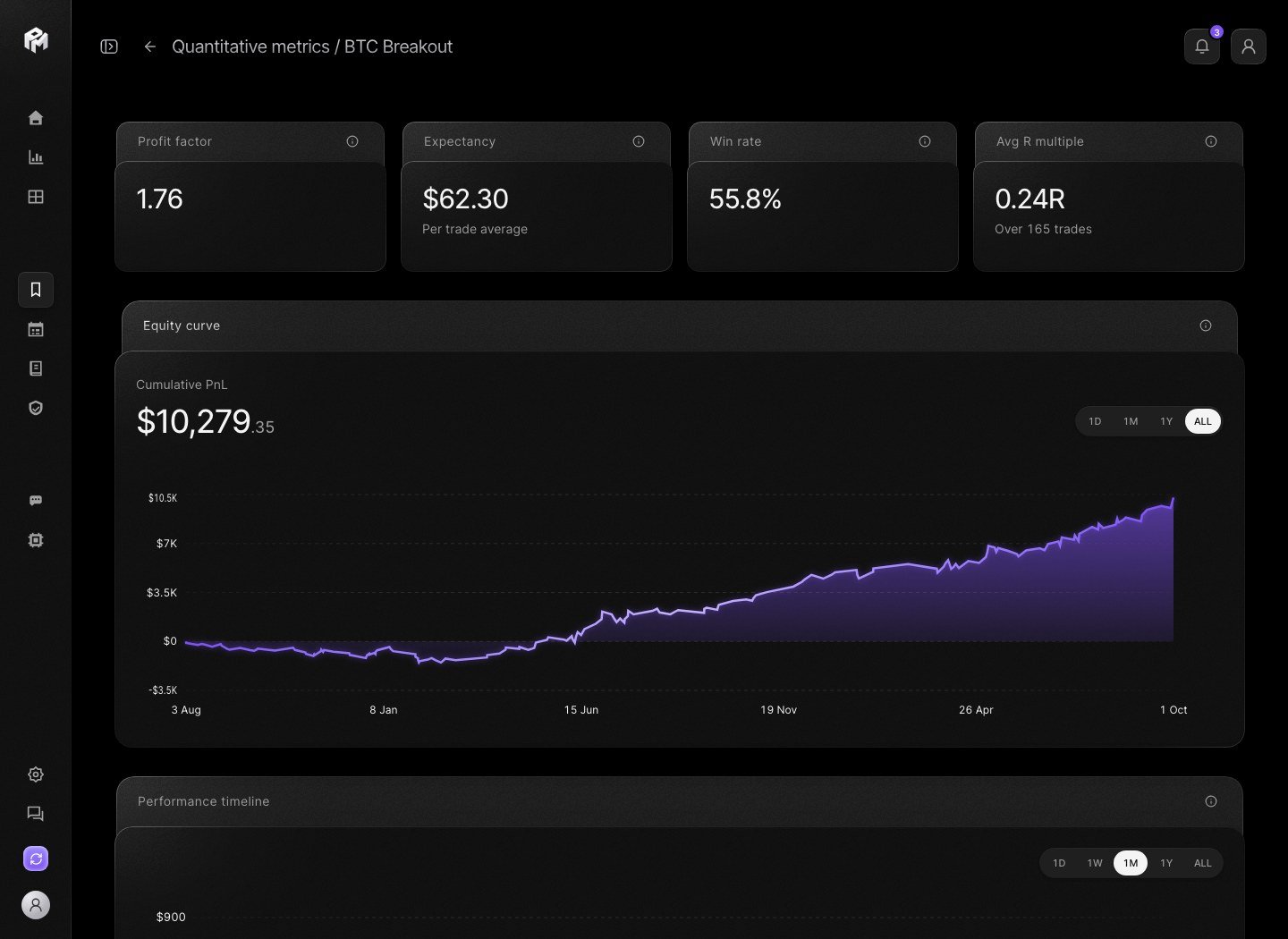
The numbers describe your historical use of that strategy. They do not prove it will work in the future. Click Analytics on a strategy card to open the strategy-scoped analysis: profit factor, expectancy, win rate, average R multiple, equity curve, performance timeline, time heatmap, MAE/MFE, and separate long and short performance. Performax demo strategy analytics page showing KPI cards, an equity curve, and performance timeline for one strategy Demo account. This view only includes trades linked to the selected strategy.

Trade plans

Trade plans let you write the plan before execution and compare it with the resulting trade later. Create one with Plan a trade in the Pending plans widget of the Dashboard. A plan includes:
  • pair;
  • side (Long or Short);
  • entry, stop and target, with the risk / reward ratio;
  • setup;
  • conviction (1 to 5);
  • why this trade;
  • your mindset right now.
After execution, open the closed trade in the Journal and use Attach under Attach a plan. Plan vs execution then compares plan and outcome, with a discipline score. Plans are not linked to a strategy.

Checklists

Use the pre-trade checklist for objective setup conditions:
  • market context;
  • confirmation signal;
  • risk check;
  • position size check;
  • invalidation condition;
  • exit rule.
Mark each question Required or Optional. If a checklist item is subjective, rewrite it until another person could evaluate it the same way.

Edit or delete

Click Edit on a card to change a strategy, then Save changes. Delete sits on the edit page and is irreversible. There is no archive: delete a strategy you no longer trade only if you no longer need its history.

Naming

The app navigation uses Strategies. Several labels still say playbook, such as Save Playbook, Applied Playbook and the Playbook filter. In this documentation, a playbook means one strategy object inside Strategies.